Hermes Agent as an AI harness
Hermes Agent as the daily harness: custom skills for business workflows, and a research profile that browses like a person, gates every page through Clef Flash on Workers AI, and compiles what passes into an LLM wiki.
Hermes Agent has been the harness for most AI work here since March 2026. OpenClaw was worth watching closely but never went into use; Hermes Agent did, as soon as it came onto the radar. OpenClaw walked so Hermes Agent could run.
Why Hermes Agent
- It learns without a frontier subscription. Hermes improves its own skills as it works, without needing a frontier model subscription behind it.
- Local wins the argument. Much of the data at work comes with government rules about where it can go. When the question is whether AI can be used on that data, local computing often wins the argument. On the work machine, only US-built models are used: Google, Meta and Liquid AI.
- Better approval gates. Its gates for approving actions looked better than OpenClaw's.
How it's used
- Business workflows. A full suite of custom ConnectWise skills, covering both API and SQL access.
- Every day at work to inspect business data, research topics, review workload and suggest next steps.
- Coding, orchestrated through a kanban board with specialist agents: research, a modeler that helped with the LFM2.5 quantization, and back-end and front-end developers.
- Many models behind it: Kimi K2.6, Qwen 3.8 27B and GLM 5.3 Flash on Workers AI; Qwen 3.8 GSQ-RCO (3-bit) and LFM2.5 24B A2B (4-bit) on local GPUs; and Qwen 3.8 Flash Next goyo-m on Strata at home.
The researcher profile
The researcher is a Hermes profile that browses the live web the way a person does, keeps only pages with real signal, and compiles them into an LLM wiki written for a person to read: plain Markdown, one folder per project, one page per concept.
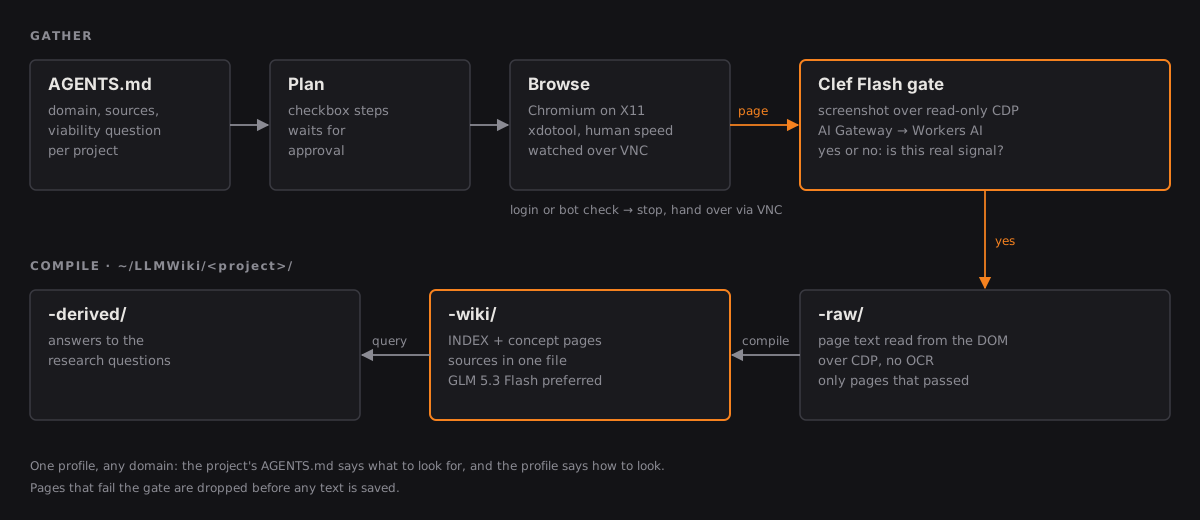
- Brief. Each project gets a folder with an AGENTS.md: the domain, the target sources, what counts as noise, and the viability question for the gate. The profile itself is domain-agnostic.
- Plan. The agent writes a checkbox plan into the project's plans folder and waits for approval before it opens a browser.
- Browse. Chromium on an X11 display, driven with xdotool at human speed. Chrome DevTools is read-only: screenshots and page text, never clicks or injected scripts. Logins, CAPTCHAs and bot checks are never bypassed; the agent stops and hands over through VNC.
- Gate. Every page is screenshotted and sent through AI Gateway to Clef Flash on Workers AI with one yes-or-no question written for that project, asking for specific evidence rather than a topic match.
- Collect, compile, answer. Pages that pass have their text read straight from the DOM, not by OCR, and saved to the raw folder. The agent compiles the raw files into a wiki for a person to read: one page per concept, each opening with what it concludes, and an index. Sources live in a single file instead of on every page, and the method stays out entirely, no gates or rubrics. Answers to the research questions go in a separate folder.
The model compiling the wiki makes a visible difference to the result. GLM 5.3 Flash on Workers AI produces the best wikis so far.
Sample files
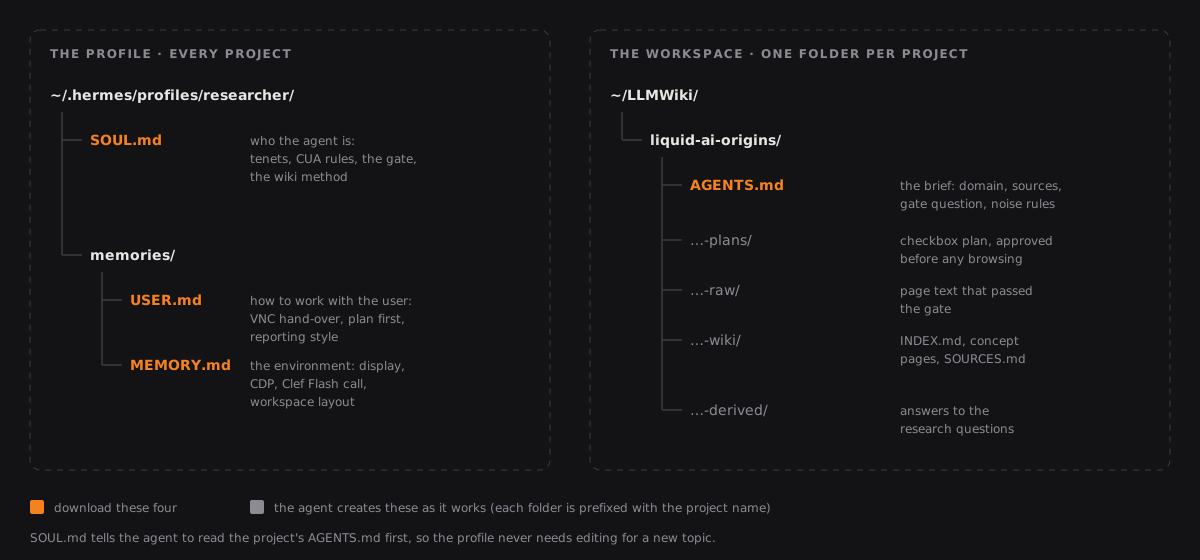
The profile's three files, ready to drop into a Hermes profile, plus an example project brief (a fresh one, on Liquid AI's research and beginnings) to put at ~/LLMWiki/liquid-ai-origins/AGENTS.md. Set your own AI Gateway ID and Cloudflare credentials.
What's next
- Researcher as an MCP server, backed by Workers. The researcher becomes an MCP server backed by Workers, publishing its results to Workers for easy browsing, with no Obsidian deployment needed.