Action Center
A Cloudflare Worker that stands between automation and ConnectWise Manage: every proposed change is audited by an AI supervisor against written playbooks, then approved by a person before it runs.
ConnectWise Manage is the operational system of record: tickets, schedules, activities, notes. Scripts that keep it in step with other systems, like removing schedule entries whose calendar event no longer exists, can make a lot of changes quickly. Run directly against the API, a script with a bug or a bad assumption writes those changes straight into the system everyone works from, with nobody looking first.
Action Center removes that direct path. Scripts and analysis tools never call the ConnectWise API. They propose actions. Each proposal is checked by an AI supervisor against written playbooks, then shown to a person, and only an approved action is sent to ConnectWise.
Architecture
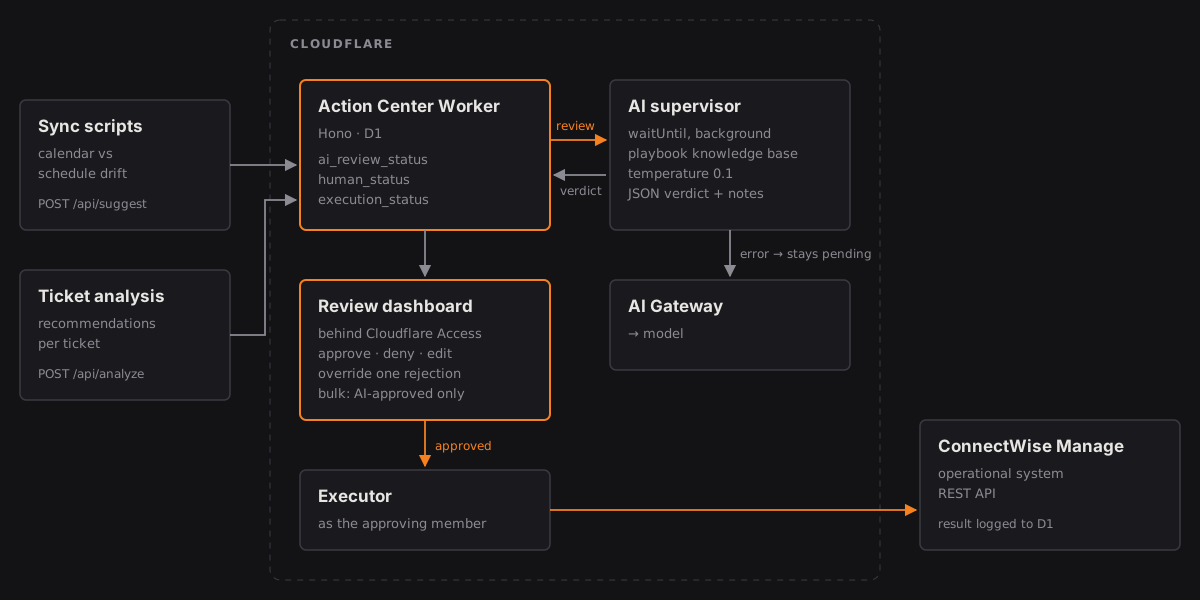
How it works
- Propose. A sync script posts a single action to the Worker, or a ticket analysis posts a set of recommendations for one ticket with a summary. Each action carries the playbook it claims to follow, the HTTP method, the endpoint, the payload and the reasoning behind it. It is stored in D1 and the call returns right away.
- Audit. In the background (waitUntil), the AI supervisor sends the action and the playbook knowledge base through AI Gateway. The model must answer in a fixed JSON shape: approved or rejected, with notes that name the playbook and say how the action does or does not fit it. If the action doesn't match an approved play, it is rejected as undefined behavior.
- Review. A reviewer signed in through Cloudflare Access sees the pending actions, grouped, each with the AI verdict, its notes and the payload. They can approve or deny one action, approve every AI-approved action in a group at once, deny every rejected one, or open an editor to change the payload first.
- Execute. An approved action is sent to the ConnectWise Manage REST API. Notes and new tickets are recorded as entered by the person who approved them, using the member ID from their synced profile. The response or the error is written back to the action.
Design decisions
- Three status fields, not one. AI review, human decision and execution are tracked separately. An action can be AI-rejected, human-approved and failed at execution, and the record shows all three, which a single status column would hide.
- Fail closed. If the gateway call fails, times out or returns something that isn't the expected JSON, the action stays pending with the error in its notes. It never defaults to approved.
- The human decides, one at a time. A person can override an AI rejection, but only on that single action, after a confirmation. Bulk approval only ever runs actions the AI approved; anything else in the selection is skipped.
- Playbooks are the rules. The AI doesn't make up policy. Each automation is a versioned Markdown playbook with its trigger, scope, approved endpoints and methods. The supervisor checks against those documents, and the dashboard's wiki tab shows reviewers the same ones, so the model and the person work from the same text. Endpoint documentation is extracted from the ConnectWise API docs into the same knowledge base.
- Accountability in the target system. Changes land in ConnectWise under the approving person's identity, not a faceless integration account, so the history there shows who said yes.
- Background audit, fast ingest. Proposals return immediately, and the audit runs after the response, so a script posting dozens of actions isn't held up by model latency.
What's next
A security design for the supervisor goes further than the current build. These parts are designed and not yet built:
- Knowledge base from R2 per request. Today the playbooks are bundled into the Worker at build time, and the audit includes every schedule and playbook page. Next, the Worker reads only the action's playbook and the documentation for its endpoint module from R2 when the audit runs, so a playbook change doesn't need a deploy and the prompt holds only what applies.
- Playbook status checks. A playbook marked draft or deprecated, or not marked approved, fails the audit immediately, before any model call.
- Edits reset the audit. Reviewers will only change safe fields for each kind of action: note text and flags for notes, status for ticket updates. Any edit sets the AI review back to pending and starts a fresh audit, so an edited action can't ride on an earlier approval.
- All-or-nothing bulk approval. Instead of skipping actions the AI hasn't approved, a batch that contains even one of them is refused as a whole with a 403.